Paste this into a coding agent on the machine that will run it. It installs v0.1.0 at baac1b92b9 with LayerFS v1.1.0 at 9f97a7ec95, the commit it was tested with. It runs the author’s build, so read it first.
Install prompt · v0.1.0
Install LayerFS × DSH 0.1.0 for me: the dsh-layerfs plugin in DeepSeek Harness (dsh) web, on real LayerFS v1.1.0, then run its scenario tests in dsh web on the default profile at http://127.0.0.1:3080 and tell me the results.

This machine is macOS, Linux or Windows: find out which, follow the steps for it and skip the others. This is an install-and-test run: change no code in any checkout. When something fails, find the cause from the source and bounded output, tell me with a proposed fix, and go on where you can.

Rules:
- Pin exactly: https://github.com/Ephemeral-AI-Lab/dsh-layerfs at commit baac1b92b97f0bd492002c285f6a13401b4f4c0b, and https://github.com/Ephemeral-AI-Lab/layerfs at commit 9f97a7ec95b662e9cb288704afa165feff132cfa. The plugin's layerfs.json names the same LayerFS commit. Read AGENTS.md in both checkouts first.
- Give every test command a wall timeout of at most 120 s, and keep every other command under 2 minutes: put timeout 110 before long steps (macOS has no timeout; use perl -e 'alarm 110; exec @ARGV' <command>) and run a long build again until it finishes, since Cargo keeps what it compiled.
- One attempt per check: no retry loops, and no reruns to turn a failure into a pass.
- Stores live on a local Linux filesystem (ext4, xfs or btrfs). On Windows never put a Store or the Linux LayerFS home on /mnt/c or any Windows-backed mount.
- Use dsh's default web profile: no DSH_HOME override. Before changing it, copy its cordis.patch.yml and package.json to a dated backup folder, and keep its existing patch entries. Never restart a dsh web that has a run in progress.
- Do not commit, push, delete other volumes or containers, or install system-wide software without asking me.

Install:
1. Prerequisites; record each version. All: Node 22.19 or newer, pnpm, python3, Docker, network access, and a built deepseek-harness checkout (https://github.com/deepseek-ai/deepseek-harness) beside the plugin, with a dsh version inside the plugin's packages/dsh-layerfs/package.json engines.dsh; if there is none, clone it there and run pnpm install && pnpm run build in it. macOS: Docker Desktop running. Linux: a Docker Engine, /dev/fuse, and a Store filesystem that is ext4, xfs or btrfs. Windows: WSL2 with a selected distribution (default Ubuntu) that has /dev/fuse, its own running Docker Engine (not Docker Desktop's Windows pipe), and Node 22.19 or newer at an absolute path. Keep at least 20 GiB free inside that Docker Engine. If something is missing that you cannot install, stop and tell me which.
2. LayerFS checkouts at 9f97a7ec95b662e9cb288704afa165feff132cfa: one on macOS or Linux; on Windows two of the same commit, one in WSL for the sealed bundle and one on Windows for the dsh Host (record core.autocrlf: the worker refuses a Windows SDK that differs from the bundle's, apart from line endings). In the checkout the Host uses, run npm install in api and npm --prefix api/agent/cli install; they only link packages.
3. Runtime image: build it from the plugin's tools/runtime/Dockerfile in the Docker Engine the worker and Sandboxes use (on Windows, the WSL one), and record its sha256 image ID. Check it has cargo (docker run --rm <image> cargo --version): the Depot scenario needs it.
4. LayerFS build. macOS and Windows: build the sealed Linux bundle with the LayerFS checkout's tools/worktree.py (register, prepare, build --platform linux --profile release; see docs/general/parallel-worktrees.md), on Windows inside WSL; record the printed build-linux-… folder and its manifest.json hash, and confirm it holds api/runtime/src/worker/server.js, layerfs-daemon and layerfs.node. Linux: build layerfs-daemon and the addon (the plugin README's step 1 recipe, or npm --prefix api run build:native), and record the daemon path and the layerfs.node dsh web will load.
5. Plugin: in the dsh-layerfs checkout, with LAYERFS_SOURCE set to the Host's LayerFS checkout, run pnpm install, then pnpm run link:layerfs, then pnpm run build with DSH_SOURCE set to the deepseek-harness checkout (absolute paths). pnpm run check:layerfs must report the checkout "at the pinned commit".
6. Plugin tests, each bounded at 120 s: pnpm test and pnpm run test:scenarios; on Windows also pnpm run test:windows.
7. Profile: add the plugin to the default web profile as the plugin README's steps 3 and 4 describe, but without the DSH_HOME override. Its layerfs-host entry in cordis.patch.yml takes: image (your sha256, on Windows from the WSL Engine); bundle (macOS: the sealed bundle; Windows: its WSL path); wslDistribution (Windows only); daemon (Linux, required; elsewhere it defaults to the bundle's layerfs-daemon); volumes (Linux: Docker's volumes directory, which dsh web's user must be able to write). Keep containerPrefix at its default unless something else in that Docker Engine already uses layerfs- containers. On Linux, run dsh web as a user that can write Docker's volumes directory (such as root), with a home that user owns, or Init fails Unsupported.
8. Start dsh web with the Node from step 1 (a login shell may pick an older one): pnpm --dir <deepseek-harness> dsh web --no-open --port 3080. GET /layerfs/status must report an empty missing list. Give me the printed http://127.0.0.1:3080/?token=… link.
9. On the LayerFS page, open All projects: Docker must be green, with host and Docker free space shown. On macOS and Windows "Store calls · worker ready" must be green; if it is not, press its Start button once and tell me what happened.

Run the scenario tests:
10. Open the LayerFS page's Tests tab. It runs the LayerFS scripted model, which ships switched on: scripted agent runs through the real dsh agent loop, with no language model or API key. Press Run all once; it runs every scenario, up to 2 at once, five through the SDK and five through the layerfs command. Most take under a minute, Depot and Crew several minutes each; the whole run takes about 15 to 20 minutes. Don't press Run again while it is going.
11. When every row has finished, tell me each scenario's result and time, and for a failure the reason its row shows. Check a failed run's session with node tools/checks/run.mjs <profile dir> <root session id> in the dsh-layerfs checkout, bounded at 120 s, and leave its project as it is.

Report every step with its command and outcome (PASS, FAIL, or NOT_RUN with the reason), the versions, the image ID, the bundle folder or daemon path, and the Tests tab table. If a step fails, stop and give me the exact error unless a rule above says to go on; don't retry it on your own.
dsh-layerfs is a plugin bundle for DeepSeek Harness (dsh). It changes no dsh code.
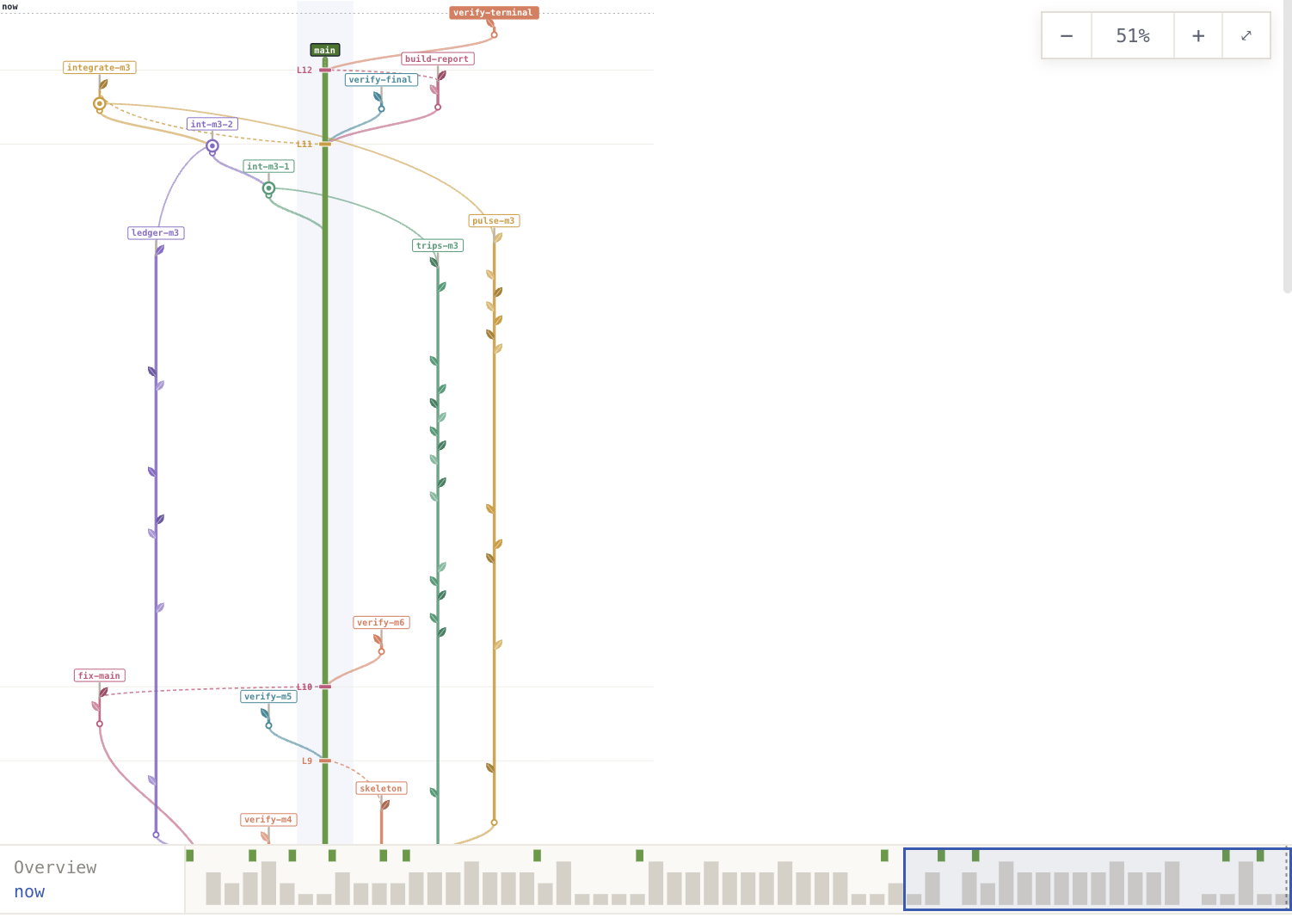
Agents in a dsh session work on a LayerFS project from bash, through the layerfs command or short Node scripts that use @layerfs/agent. They fork Branches, test them in Sandboxes, merge and publish, and the conversation gets Work and History tabs that draw what each agent did, subagents included.
What it adds
Minimalist preset. “LayerFS × DSH minimalist”: bash with background jobs, subagents and compaction, and no read, write or edit tools. Its persona carries an SDK cheat-sheet and the working rules: one Workspace per agent, only the main agent publishes, unmount every Workspace.
Project chip. Beside the preset chip when you start a session: pick a project, start an empty one, or import a folder as a new project.
Work and History tabs. Beside Chat and Trajectory: the agents’ terminals, Branches and Sandboxes, played in step with the run; and the project’s History, Files and Storage.
LayerFS page. In the sidebar, one tab per project: History and Files side by side, a new session on the project, and Remove.
Scripted demo, on by default. The LayerFS scripted model plays ten scripted agent runs (Tour, Parallel Branches, Conflicts, 5 agents, Shop, Depot, Crew and more) through the real dsh agent loop, with no language model or API key. Run them from the LayerFS page’s Tests tab; turn @dsh-layerfs/mock off on dsh’s Plugins page to hide it.
How it works
dsh session (agents, subagents, bash) → layerfs-host (bash environment, records) → the layerfs command or @layerfs/agent → Store and Sandboxes.
Each finished LayerFS call becomes a record in the calling agent’s own session, and the client plugin reads those records back to draw the tabs. On Linux the Host and the agents’ scripts open the Store in their own process. On macOS a long-lived Linux container, the LayerFS home’s worker, runs them; on Windows a worker in WSL2 does. Both come from @layerfs/runtime.
Two recorded runs
Run
Time
History
Store
Wayfare, a trip planner in Node 24
56 min, 8 agents
147 Commits, 31 Branches
1.21 MB on disk for 91.5 MB of snapshots, 27× dedupe
Quarry, a SQL database in Rust
4 h 16 min, 8 agents
913 Commits, 56 Branches
8.90 GB on disk for 4.93 TB of snapshots, 166× dedupe
Both runs, the video and a first-session tutorial are on the LayerFS × DSH page.
You need
Node 22.19 or newer, and pnpm
A built deepseek-harness checkout
Docker, for Live projects: Docker Desktop on macOS, a Docker Engine inside WSL2 on Windows
Network access for the first LayerFS build
Limits
Checked live in dsh web on macOS and Windows (WSL2); Linux has no live run yet.
Only dsh web is checked. dsh desktop serves the same web client but was not tested.
A session’s project is fixed at its first bash call that uses it.
Store calls need Linux and a local filesystem; on macOS and Windows the worker provides them. See Platform and limits.
Versions
Each version pins the plugin’s commit and the LayerFS release and commit it was tested with.
Version
Date
Plugin commit
LayerFS
v0.1.0newestFirst listing: Work and History tabs, project chip, LayerFS page, minimalist preset; verified live on macOS and Windows.